Excel to Google Calendar: import event lists and birthdays
To get an Excel list into Google Calendar, convert it into a Google CSV or – for birthdays – into an ICS file with yearly recurrence, then import it on a computer. Birthdays don’t work well as CSV: from a CSV file, Google creates recurring events as a series of single events. The tool detects name and birthday columns and creates all-day events that repeat every year.
As of 7 October 2026 · Source: Google Calendar Help: Import events to Google Calendar
Step by step: from Excel to Google Calendar
- Prepare the list
For birthdays, one column with the name and one with the date of birth is enough. A ready-made template is available in the tool. - Drop the Excel file into the tool
The tool understands Excel date values, DD.MM.YYYY and other formats. If dates are ambiguous, it asks. - Check the birthday mode
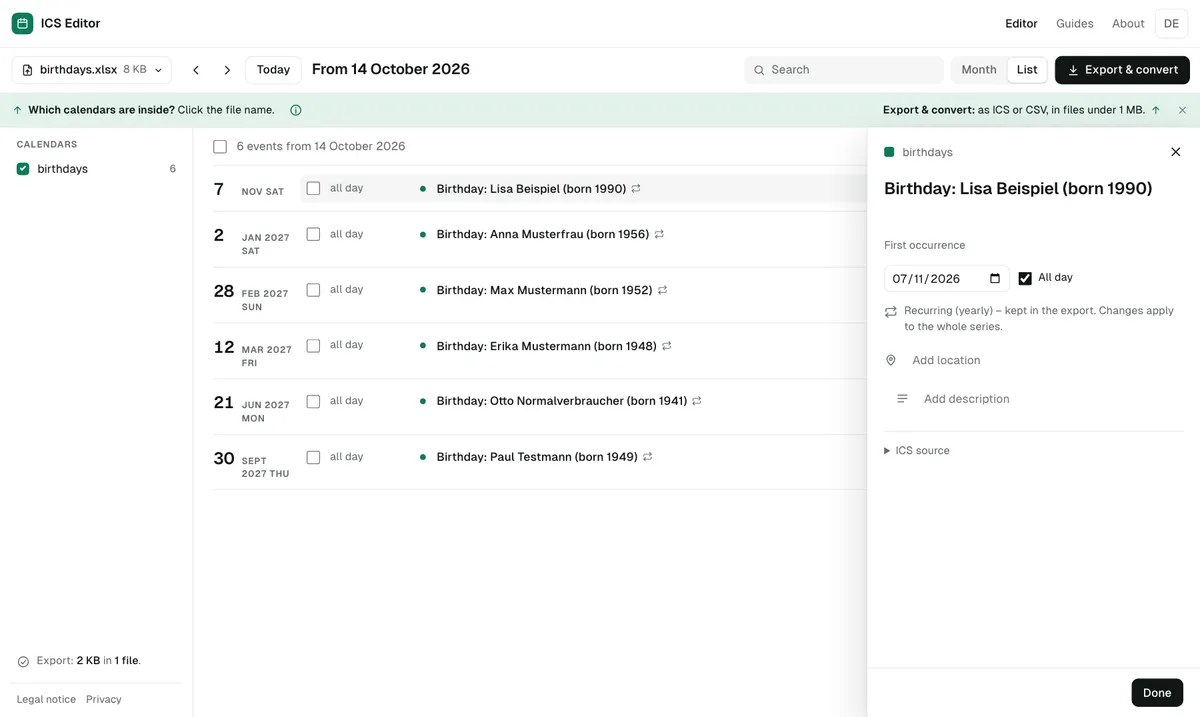
Detected birthday lists are created as yearly all-day events – optionally with the birth year in the title. - Download
A birthday list almost always stays far below 1 MB and fits into one file. - Import on a computer
Create a new calendar “Birthdays”, then Settings → Import & export → Select file from your computer → Import.
Why ICS and not CSV for birthdays?
According to Google, recurring events from a CSV file turn into a series of one-time events. An ICS file, by contrast, can contain a real rule: “every year on 12 March”. That’s why the tool always creates an ICS file for birthdays. More: CSV to ICS converter.
What about birthdays on 29 February?
For 29 February the tool creates a rule that falls on 28 February in years without a 29 February, so the birthday is never missing.
Other Excel lists
Club events, rosters or training schedules from Excel work the same way: the tool maps the columns (title, date, time, location) and creates either a Google CSV or an ICS file. It detects phone numbers or addresses in the list and offers to leave them out.
Frequently asked questions
Do I need to save my Excel file as CSV first?
No. The tool reads XLSX files directly – in your browser, without uploading.
Can the event show the person’s age?
A yearly recurring event can’t carry a changing age. Instead, the tool puts the birth year in the title, e.g. “Birthday: Erika Huber (born 1948)”.
Are birthdays created as all-day events?
Yes – all-day and marked as “free”, so they don’t block your calendar.
Sources
All information as of 7 October 2026.