Can’t import CSV to Google Calendar? Here are the fixes
An import usually fails for one of four reasons: the file uses semicolons instead of commas, the column names aren’t in English, the date format is wrong, or the file is larger than 1 MB. Google Calendar requires commas as separators and English column names; only “Subject” and “Start Date” are mandatory.
As of 7 October 2026 · Source: Google Calendar Help: Import events to Google Calendar
Step by step to an importable CSV file
- Drop the file into the tool
The tool detects the separator (including semicolons), the character set (including Windows/Excel), German and English column names and common date formats by itself. - Confirm the date format
If a date like 03/04/2025 is ambiguous, the tool asks once per column instead of guessing. - Check for errors
Under “Check” you see every problem row in plain language, e.g. “Row 14: The end is before the start”, each with a suggested fix. - Download as Google CSV
The file then has English column names, commas as separators and the date format from Google’s example (05/30/2020, 10:00 AM). - Import on a computer
Google Calendar → Settings → Import & export → Select file from your computer → Import.
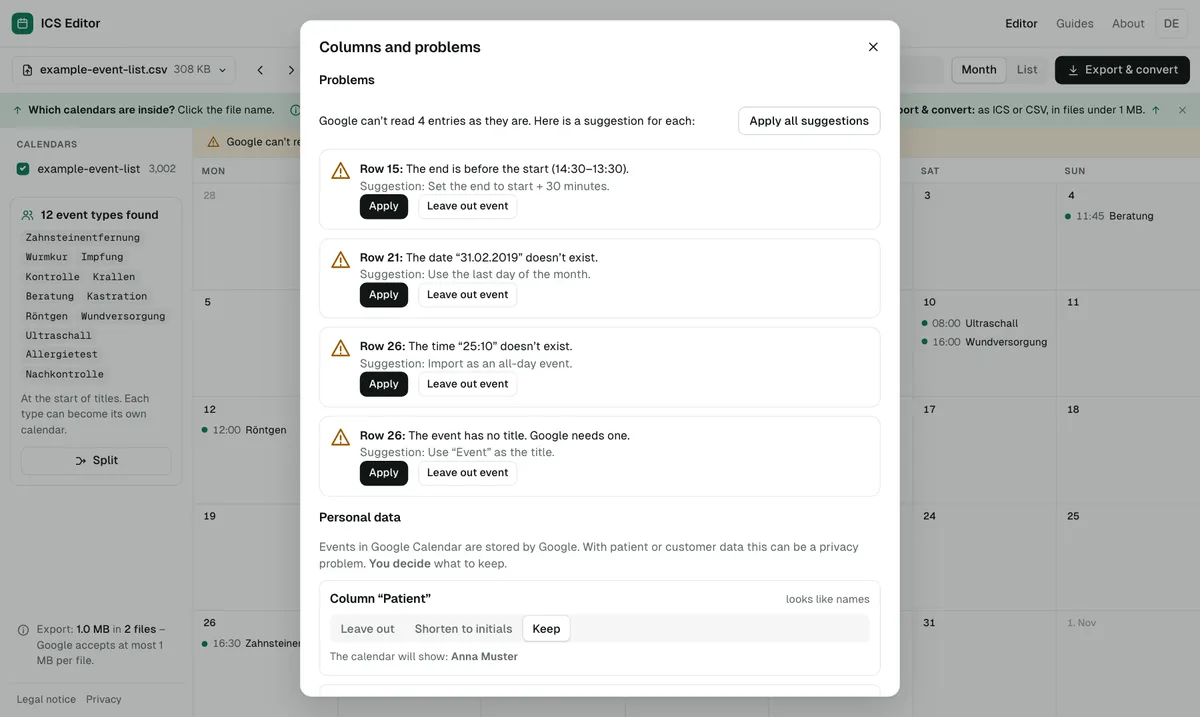
The most common causes
| Cause | How to spot it | Fix |
|---|---|---|
| Semicolons instead of commas | European Excel exports often separate columns with semicolons | Convert to a comma CSV |
| Non-English column names | “Datum”, “Betreff” instead of “Start Date”, “Subject” | Map the columns |
| Date format | DD.MM.YYYY instead of the format in Google’s example (MM/DD/YYYY) | Convert; ask when ambiguous |
| File larger than 1 MB | “Google Calendar is temporarily unavailable” | Shrink or split the file |
| Broken special characters | “Müller” instead of “Müller” | Detect the character set and save as UTF-8 |
Google’s error messages – and what they mean
- “Processed zero events”: according to Google often because Import was clicked twice. The first click worked – check your calendar.
- “Processed x of y events”: Google couldn’t read some events. Google recommends exporting the file again and checking its format.
- “The connection to the server was reset”: usually a formatting error in the file.
- “Google Calendar is temporarily unavailable”: usually the file is larger than 1 MB.
What a Google CSV must look like
The first row contains the column names in English. Only Subject and Start Date are required; Start Time, End Date, End Time, All Day Event, Description, Location and Private are optional. If a value contains a comma, it is wrapped in quotation marks. You can download a blank template in the tool.
Frequently asked questions
Can I import the file on my phone?
No. Google Calendar only lets you import on a computer, not on a phone or tablet. You can still prepare the file with the tool on your phone.
Why can’t I import a calendar into Google Calendar?
The most common reasons: the file is larger than 1 MB, the CSV uses semicolons instead of commas, the column names aren’t in English, or you’re trying on a phone – import only works on a computer. A ZIP file has to be unzipped first.
Does the CSV need English column names?
Yes. Google requires English column names. Only “Subject” and “Start Date” are mandatory.
Why do my recurring events become single events?
From a CSV file, Google creates recurring events as a series of one-time events. Real recurrence only works with an ICS file.
Sources
All information as of 7 October 2026.