Google Calendar limits: import limits and usage limits
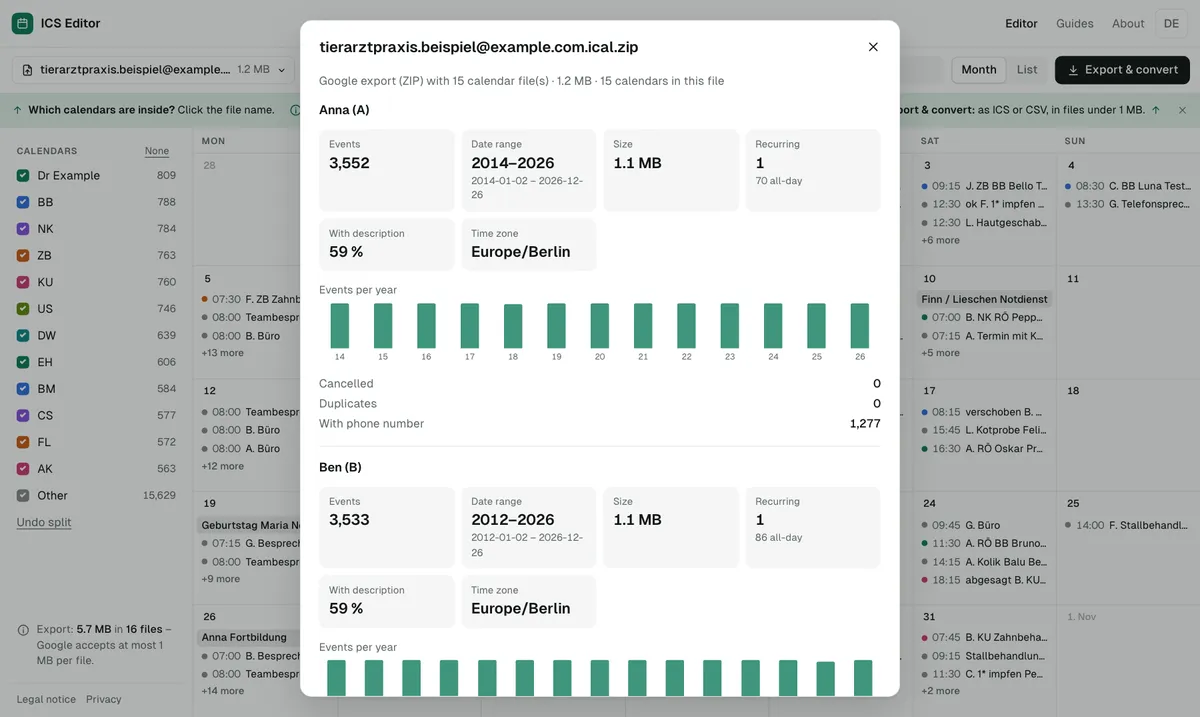
The most important Google Calendar import limit is the file size: at most 1 MB per file, for both CSV and ICS. On top of that come format rules (comma as the only separator, English column names), import on a computer only, and – for Workspace accounts – a usage limit if more than 100,000 events are created in a short period.
As of 7 October 2026 · Source: Google Calendar Help: Fix problems importing
How to stay within every limit
- Check the size
Open the file in the tool: it shows the size and whether it is over 1 MB. - Check the format
The tool converts semicolon files and non-English column names into Google’s format. - Split
Files that are too large are split into parts under 950 KB, each importable on its own. - Import on a computer
Import is only available in Google Calendar on a computer.
All limits at a glance
| Limit | What happens | What helps |
|---|---|---|
| At most 1 MB per import file (CSV and ICS) | “Google Calendar is temporarily unavailable” | Shorten the date range or split the file – see file too large |
| CSV must use commas – semicolons or colons don’t work | Import fails or reads fields wrongly | Convert the file to Google’s format – see can’t import CSV |
| Column names must be in English; only “Subject” and “Start Date” are required | Events aren’t recognised | Let the tool map the columns |
| Import only on a computer, not on a phone or tablet | The option is missing on mobile | Prepare the file, import on a computer |
| Recurring events from a CSV become single events | No real recurrence | Use ICS instead – see CSV to ICS converter |
| Guests and conference data are not imported | Attendees and video links are missing | If needed, copy them into the description first |
| ZIP files must be unzipped; import each ICS file separately | A ZIP can’t be imported directly | Unzip it, or drop the ZIP into the tool |
| Workspace: more than 100,000 new events in a short period | Fewer or no new events and no editing for hours | Import only what you need; spread imports over several days |
| Workspace: more than 60 new calendars in a short period | Restricted for a few hours | Don’t create too many target calendars at once when splitting |
Is there a maximum number of events per import?
Google doesn’t state a maximum number of events per import file. What counts is the 1 MB file size. How many events fit into 1 MB depends on how long your titles and descriptions are – the tool calculates it for your file, to the byte.
Google Calendar usage limits exceeded: what applies to Workspace
In its help for Workspace administrators, Google describes usage limits designed to prevent abuse. Anyone who creates more than 100,000 events in a short period may have their ability to create events reduced and may not be able to edit events for a few hours. For certain account types – such as trial accounts or free education and nonprofit editions – Google explicitly doesn’t publish exact limits. For personal Google accounts, that help page gives no numbers.
If you split a large calendar across several accounts, don’t import all the parts at once.
And if the import goes wrong?
There is no undo button for imports. You can, however, delete a calendar you created specifically for the import; in your main calendar you could only delete all events. Details: undo a Google Calendar import.
Frequently asked questions
What does “Google Calendar usage limits exceeded” mean?
It refers to the limits Google sets against abuse. For Workspace accounts, Google mentions for example more than 100,000 events created in a short period; after that, you may not be able to edit events for a few hours.
How large can an ICS file for Google Calendar be?
At most 1 MB – the same limit as for CSV files.
Why does Google reject my semicolon CSV?
Google Calendar only works with commas as separators. Files that use semicolons or colons don’t work.
Sources
- Google Calendar Help: Fix problems importing
- Google Calendar Help: Import events to Google Calendar
- Google Workspace Help: Avoid Calendar use limits
- Google Calendar Help: Delete or unsubscribe from a calendar
All information as of 7 October 2026.