Import a large calendar file into Google Calendar in parts
To import a calendar file that is too large, split it in the ICS Editor into files under 1 MB – optionally with at most 999 events per file – and import each file separately on a computer via Settings → Import & export into the same calendar. In our test, Google then reported 999 of 999 events imported: if both numbers match, every event has arrived.
As of 7 October 2026 · Source: Google Calendar Help: Import events to Google Calendar
Step by step: import in parts
- Open the file in the ICS Editor
Drag the ICS file or Google’s ZIP export into the editor. The file stays on your device. - Choose the calendars
On the left, tick only the calendars you want to import – for example one person’s calendar. Hidden calendars are not exported. - Split and download
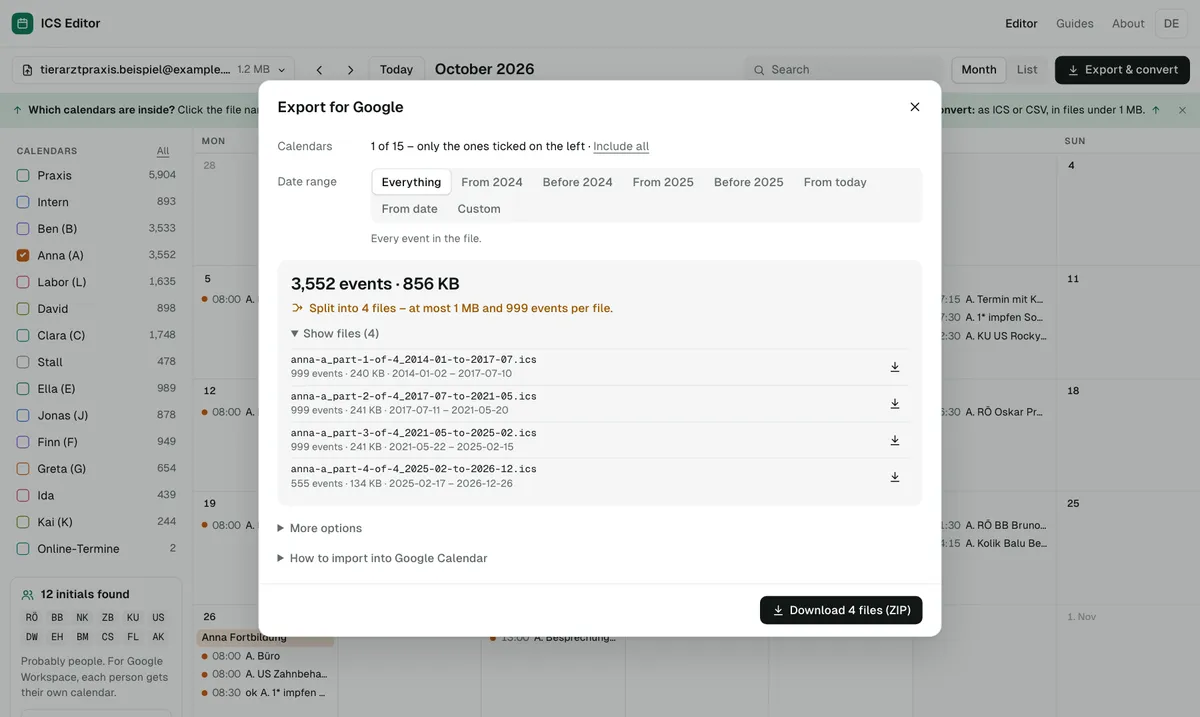
Click “Export & convert”, choose the date range and, if you like, tick “At most 999 events per file” under “More options”. Then download the ZIP file and unzip it. - Create the destination calendar
In Google Calendar on a computer, create a new, empty calendar. If something goes wrong, you only delete that calendar. - Import the first part
Gear icon → Settings → Import & export. Under “Import”, select the file “…_part-1-of-…”, choose the new calendar as the destination and click “Import” once. - Check the message
Google reports how many events were imported, for example 999 of 999. If both numbers match, the part is complete. - Import the remaining parts
Import the other files the same way, one after the other, into the same calendar – and check the message each time.
Field test: 999 of 999 events
We tested the process in October 2026 with a real Google Calendar export from a practice (analysed in the browser only, without names). For one person’s calendar we chose the date range “From 2025” in the ICS Editor and ticked “At most 999 events per file”. That produced three files, the first with events from January to October 2025.
We imported this first file into that person’s calendar in Google Calendar on a computer. Google (German interface) reported: “999 von 999 Terminen importiert” – 999 of 999 events imported. The number matched exactly what the ICS Editor had shown before the download, so every part can be checked at once.
Reading the file names
The ICS Editor names each file after the calendar, the part and the date range, for example anna-a_part-1-of-4_2014-01-to-2017-07.ics: calendar “Anna (A)”, part 1 of 4, events from January 2014 to July 2017. Recurring events always sit complete in one file, so no repetition is lost.
If the numbers don’t match
| Message | Meaning | What helps |
|---|---|---|
| Fewer imported than in the file | Google couldn’t read some events. | Open the file in the ICS Editor, check it and export again. |
| “Processed zero events” | According to Google often a second click on “Import” – the first one worked. | Check the calendar, don’t import again. |
| “Google Calendar is temporarily unavailable” | Usually the file is larger than 1 MB. | Shrink or split the file further. |
If an import went wrong, see undo a Google Calendar import.
Frequently asked questions
Do I have to import the parts in a particular order?
No. Each file contains complete events, and recurring events always sit complete in one file. It is still clearest to start with part 1 and check the message each time.
Does Google require at most 999 events per file?
No. Google states a maximum size of 1 MB per import file. “At most 999 events per file” is an optional setting in the ICS Editor: the files stay manageable and the message after the import is easy to check.
Can I import several people’s calendars separately?
Yes. In the ICS Editor, leave only one person’s calendar ticked and export it. Each person gets their own files and imports them into their own Google calendar – for example when moving to Google Workspace.
Can I import the file on my phone?
No. Google Calendar only lets you import on a computer, not on a phone or tablet. You can still prepare the file with the tool on your phone.
Sources
- Google Calendar Help: Import events to Google Calendar
- Google Calendar Help: Fix problems importing
- Google Calendar Help: Create a new calendar
All information as of 7 October 2026.